-

Minecraft PE / Bedrock 26.70.22 (1.21.132/26.60)
More epic battles in the new structure, wind -

Dynamic Lights PE Addon for MCPE 1.16/1.17/1.18/1.19/1.20/1.21/26.60+
Dynamic Lights has long been created for almost -

TreeCapitator Addon for Minecraft PE 1.17/1.18/1.19/1.20/1.21.132 (26.60)+
No modifications, now the old TreeCapitator is -

Vein Miner & TreeCapitator Addon for Minecraft PE 1.17/1.20/1.21/26.70+
Start your first day working as a miner or -

Apollon Client 6.70 for Minecraft PE 1.21.114/26.52
Apollon is a standalone client wrapped in -

Minecraft Bedrock 1.21.132/26.60/26.70.21 Patched (apk)
Do you prefer to play non render dragon shaders -

Body Actions Addon v3.4.13 for Minecraft PE 1.19/1.21.110/26.60+
Humanization of characters in Minecraft Bedrock -

LeviLauncher v0.3.11 (LeviLaunchroid v1.6.0) for Minecraft Bedrock 1.21.132/26.60
LeviLauncher is the tool you've been -

Shadow Company Addon for Minecraft PE 1.21/26
A killer weapon addon for Minecraft Bedrock, -

Newb (Legacy/ Dragon/ Trailer/ Glow/ Firelight/ Gold/ Dynamite/ Memories/ Stellar/ AI/ Plus)
Uniting under a single name, all presented Newb
Bedrock Voice Chat (BVC) v1.0.0 Beta 27 for Minecraft PE 26.70+
- Author: Bernard
- Date:
Tired of typing in Bedrock while you're fighting someone, and sick of the chaos on Discord when everyone's shouting at once? Bedrock Voice Chat is a voice chat system for Bedrock Edition servers, with functionality similar to VCMC but working differently.
By: Alaydriem (YouTube channel)
Changelog v1.0.0 Beta 27:
-
Bugfixes
- MCBE 26.60 support
Changelog v1.0.0 Beta 23:
-
Added an in-game interface for individual player volume control as well as quick Mute (microphone) and Deafen (audio) toggles.
-
Reworked session validation and client authorization to protect against packet spoofing and desync errors
-
Updated the
bedrock-protocollibrary for proper support of current game versions and accurate player positioning. -
Improved network packet serialization (refactored
Varintread/write) to reduce voice stream latency. -
Updated server mods (
mods/).
Changelog v1.0.0 Beta 21:
- Mod builds
Changelog v1.0.0 Beta 20.1:
- Minecraft 26.40 support. Replace with your existing packs.
Changelog v1.0.0 Beta 20:
- No-net implementation audio sync
- UI element for the onboarding page lacked vertical scrolling
Features of Bedrock Voice Chat:
- Hear other players based on their location and distance from you.
- Communicate with your team in dedicated audio channels.
- Adjust each player's volume, or mute their microphone or audio.
- Record conversations on separate tracks for content creators.
- Built-in noise cancellation and audio amplification.
- Full encryption of all voice data.
- Automatic microphone activation when speaking.
- Uses the Opus audio codec.
- Works on Windows, Android, and iOS.
- Realms support
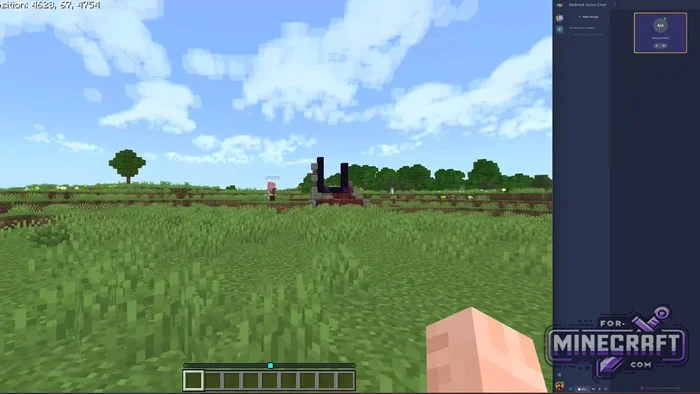
Positional voice chat in Bedrock:
The closer you get to another player, the louder you hear them. Move further away, and the sound fades while you can still tell which direction they're coming from. Positional chat is cool, but Bedrock Voice Chat offers a few more cool features which we'll cover below.
- Create permanent audio channels for your team to communicate when you're on opposite ends of the map.
- You can mute yourself, disable incoming audio, or adjust each player's volume individually.
- Record audio to separate audio tracks with timecode support
- Built-in noise reduction + audio amplification. Audio settings, including input and output device selection, as well as noise reduction parameters (Open Threshold, Close Threshold, Attack Rate, etc.)
- All voice communication is fully encrypted
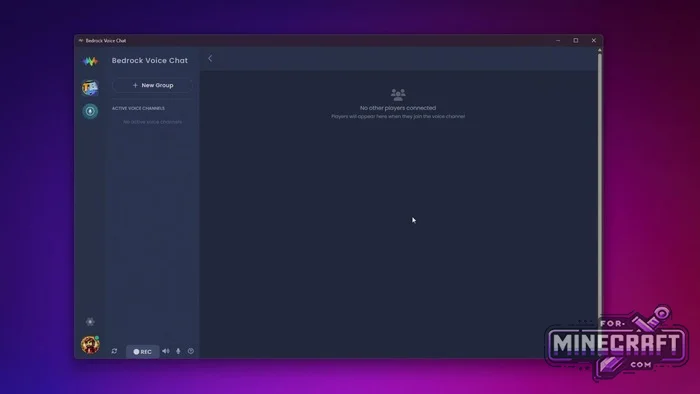
How to install and get started:
The first part is a behavior pack (or Java mod) that is installed on your server. It sends player position data to a dedicated voice chat server written in Rust. The second part is the client application. You launch it, and it connects to the voice chat server.
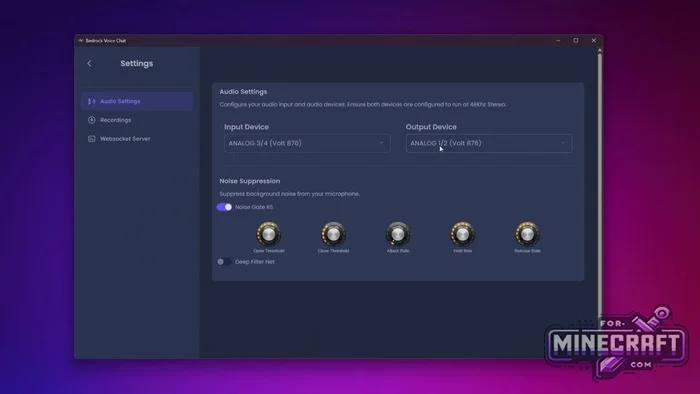
Installing BVC on Minecraft Bedrock requires configuration by an administrator, you'll need to install the add-on, start the voice chat server, and configure the settings file. If you're using Realms or a server where you cant enable @minecraft/server-net, there's a special version called no-net.mcaddon.
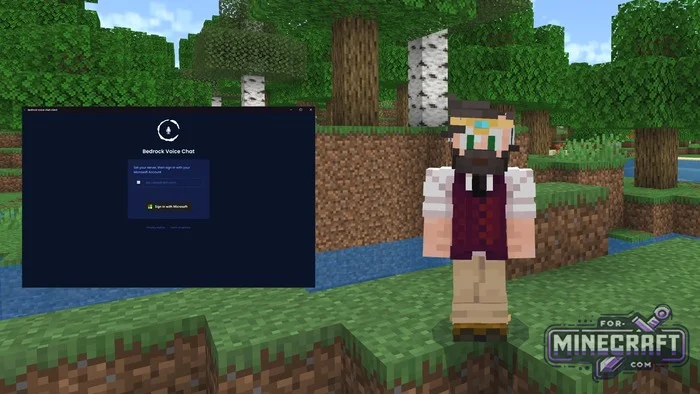
For players: all you need to do is download the app, enter the server address, and sign in with your Microsoft account. The client is available for Windows, iOS, and Android. Download it and try voice chat in Minecraft Bedrock.
Download Bedrock Voice Chat (BVC) v1.0.0 Beta 19 for Minecraft 26.X+ (apk)
Download Bedrock Voice Chat (BVC) v1.0.0 Beta 19 for Minecraft 26.X+ (appImage)
Download Bedrock Voice Chat (BVC) v1.0.0 Beta 20 for Minecraft 26.X+
Download Bedrock Voice Chat (BVC) v1.0.0 for Minecraft 26.X+ (Win/exe)
Download Bedrock Voice Chat (BVC) v1.0.0 Beta 21 for Minecraft 26.40+ (All Platforms)
Download Bedrock Voice Chat (BVC) v1.0.0 Beta 23 for Minecraft 26.70+ (All Platforms)
Download Bedrock Voice Chat (BVC) v1.0.0 Beta 27 for Minecraft 26.70+ (All Platforms)
Reason: Added 27 beta with 26.70 support
- Category: Bedrock Tools
Recommend:
-
 VCMC v2.2.4 (Voice Chat for Minecraft Bedrock 26.X)
There's VCMC, a voice chat feature that works right within Bedrock Edition (and Java Edition as well)..
VCMC v2.2.4 (Voice Chat for Minecraft Bedrock 26.X)
There's VCMC, a voice chat feature that works right within Bedrock Edition (and Java Edition as well)..
-
 IndustrialCraft PE Mod 2.4.8 for Minecraft PE 1.16
The IndustrialCraft PE history continues and now it goes to a new level..
IndustrialCraft PE Mod 2.4.8 for Minecraft PE 1.16
The IndustrialCraft PE history continues and now it goes to a new level..
-
 Inner Core for Minecraft PE 1.16 - 3.1.1b127-128 (ARM64 Update)
Inner Core was created on the basis of the original MCPE 1.0.3 and is a full complement for creating and playing with
Inner Core for Minecraft PE 1.16 - 3.1.1b127-128 (ARM64 Update)
Inner Core was created on the basis of the original MCPE 1.0.3 and is a full complement for creating and playing with
-
 IndustrialCraft PE mod v2.0 Pre-Release 7 for Minecraft PE
IndustrialCraft PE is a global mod for MCPE which is a very accurate IndustrialCraft copy for Minecraft PC. It
IndustrialCraft PE mod v2.0 Pre-Release 7 for Minecraft PE
IndustrialCraft PE is a global mod for MCPE which is a very accurate IndustrialCraft copy for Minecraft PC. It
-
Minecraft PE / Bedrock 26.70.22 (1.21.132/26.60)
More epic battles in the new structure, wind shooting mob, auto crafting and more..
