Popular
-
Faithful Textures for MCPE 1.16/1.17/1.19/1.20/1.21/26.52 (32x/64x/128x) (RTX)
Now you can play with the most popular -

Minecraft PE 26.60.30 (1.21.132/26.52)
More epic battles in the new structure, wind -

Dynamic Lights PE Addon for MCPE 1.16/1.17/1.18/1.19/1.20/1.21/26.60+
Dynamic Lights has long been created for almost -

X-Ray for Minecraft Bedrock Edition 1.19/1.20/1.21.132/26.60+
X-Ray is a cult cheat in the past, available as -

TreeCapitator Addon for Minecraft PE 1.17/1.18/1.19/1.20/1.21.132 (26.60)+
No modifications, now the old TreeCapitator is -

Vein Miner & TreeCapitator Addon for Minecraft PE 1.17/1.20/1.21/26.60+
Start your first day working as a miner or -

Java Combat System Addon v8.0 for Bedrock 1.17/1.18/1.19/1.21/26.60+
Install this updated combat system in the form -

Minecraft Bedrock 1.21.132/26.44/26.60.29 Patched (apk)
Do you prefer to play non render dragon shaders -

Body Actions Addon v3.4.12 for Minecraft PE 1.19/1.21.110/26.60+
Humanization of characters in Minecraft Bedrock -

LeviLauncher v0.3.11 (LeviLaunchroid v1.5.25) for Minecraft Bedrock 1.21.132/26.60
LeviLauncher is the tool you've been
0
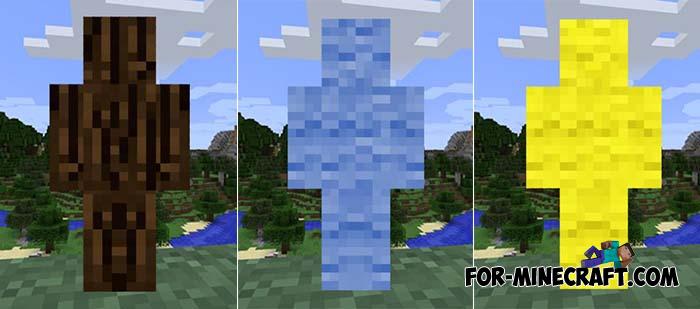
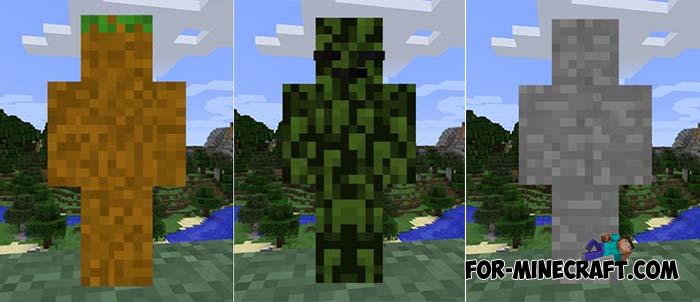
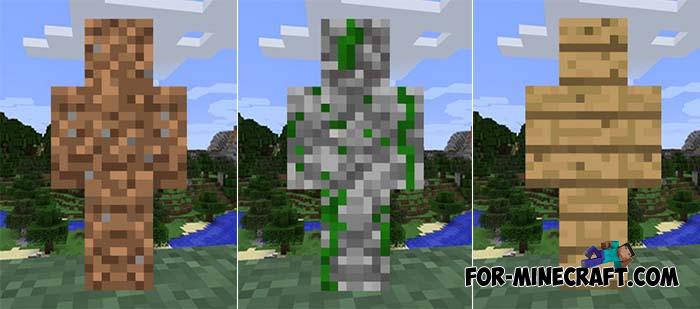
No 4D effect, these skins work perfectly on servers and can turn you into a walking camouflage. Over 100 block skins for Minecraft Bedrock from trees to terracotta will make you invisible to the rest if you merge with the background. Just choose a skin suitable for the environment and go to the wall, mountain, hill. Only the nickname displayed can give you away.
By: Legopitstop
As already mentioned, the skin pack offers more than 100 skins. They are divided by color / type, so you need to choose a color first.


Perhaps the main reason why you should take these skins is servers for Minecraft PE. When playing in the overworld, you can always choose one or another skin suitable for camouflage. There are both landscape blocks and more rare ones obtained in a furnace.

1. Open the downloaded file using Minecraft PE.
2. Go to customize and choose one.
Block Texture Skin Pack for Minecraft PE 1.13/1.14
- Author: Bernard
- Date:
No 4D effect, these skins work perfectly on servers and can turn you into a walking camouflage. Over 100 block skins for Minecraft Bedrock from trees to terracotta will make you invisible to the rest if you merge with the background. Just choose a skin suitable for the environment and go to the wall, mountain, hill. Only the nickname displayed can give you away.
By: Legopitstop
Block Skins:
As already mentioned, the skin pack offers more than 100 skins. They are divided by color / type, so you need to choose a color first.
• Black
• Blue
• Brown
• Cyan
• Gray
• Green
• Light blue
• Light gray/silver
• Lime
• Magenta
• Orange
• Pink
• Purple
• Red
• White
• Yellow
• Rock
• Coral blocks
• Acacia
• Dark oak
• Jungle
• Oak
• Spruce
Usage in multiplayer:
Perhaps the main reason why you should take these skins is servers for Minecraft PE. When playing in the overworld, you can always choose one or another skin suitable for camouflage. There are both landscape blocks and more rare ones obtained in a furnace.
How to install the Block Texture Skin Pack?
1. Open the downloaded file using Minecraft PE.
2. Go to customize and choose one.
- Category: Skins for Minecraft Bedrock
Recommend:
-
 Chisel Addon v2.0.0 for Minecraft PE 1.14/1.20
A couple of years ago, Chisel was in the top 10 most popular mods for Minecraft thanks to a huge number of new
Chisel Addon v2.0.0 for Minecraft PE 1.14/1.20
A couple of years ago, Chisel was in the top 10 most popular mods for Minecraft thanks to a huge number of new
-
 The Wall - Game of Thrones (Minecraft PE)
Now it's your turn to go to the wall and serve the night watch. Their brotherhood is located in Castle Black near
The Wall - Game of Thrones (Minecraft PE)
Now it's your turn to go to the wall and serve the night watch. Their brotherhood is located in Castle Black near
-
 The Walking Dead Locations for MCBE 1.8
This map is a reflection of the events that occurred in The Walking Dead since the first series..
The Walking Dead Locations for MCBE 1.8
This map is a reflection of the events that occurred in The Walking Dead since the first series..
-
 IndustrialCraft PE mod v2.0 Pre-Release 7 for Minecraft PE
IndustrialCraft PE is a global mod for MCPE which is a very accurate IndustrialCraft copy for Minecraft PC. It
IndustrialCraft PE mod v2.0 Pre-Release 7 for Minecraft PE
IndustrialCraft PE is a global mod for MCPE which is a very accurate IndustrialCraft copy for Minecraft PC. It
-
 Blue City Map n2.2 for Minecraft PE 1.15/1.16
Blue City is one of the oldest cities for Minecraft Pocket Edition..
Blue City Map n2.2 for Minecraft PE 1.15/1.16
Blue City is one of the oldest cities for Minecraft Pocket Edition..
