-

Minecraft PE 26.70.21 (1.21.132/26.52)
More epic battles in the new structure, wind -

Dynamic Lights PE Addon for MCPE 1.16/1.17/1.18/1.19/1.20/1.21/26.60+
Dynamic Lights has long been created for almost -

Vein Miner & TreeCapitator Addon for Minecraft PE 1.17/1.20/1.21/26.70+
Start your first day working as a miner or -

Apollon Client 6.70 for Minecraft PE 1.21.114/26.52
Apollon is a standalone client wrapped in -

Minecraft Bedrock 1.21.132/26.44/26.70.21 Patched (apk)
Do you prefer to play non render dragon shaders -

LeviLauncher v0.3.11 (LeviLaunchroid v1.6.0) for Minecraft Bedrock 1.21.132/26.60
LeviLauncher is the tool you've been -

Shadow Company Addon for Minecraft PE 1.21/26
A killer weapon addon for Minecraft Bedrock, -

Newb (Legacy/ Dragon/ Trailer/ Glow/ Firelight/ Gold/ Dynamite/ Memories/ Stellar/ AI/ Plus)
Uniting under a single name, all presented Newb -

Mini Structures Addon v2.0 for Minecraft PE 1.18/1.19/1.20/1.21/26.70+
There are 30 structures at the moment, and all -

Flarial Client - Release for Minecraft Bedrock 1.20/1.21/26.52
Full control over the game through ultimate
AdminCore Plugin v1.0.2 (12 Server Addons) for Minecraft Bedrock 1.21/26
- Author: Bernard
- Date:
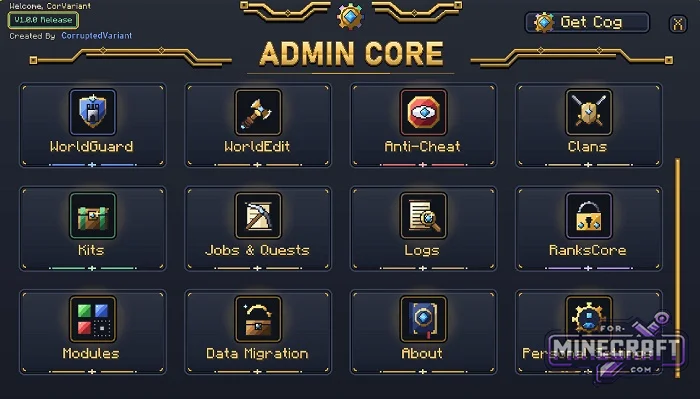
If you're tired of downloading plugins for your Bedrock server one by one and hoping they won't conflict with each other, install Admin Core. It combines all administration tools into a single system with a unified interface and shared databases. Open the menu, select a module, then configure it and apply it to players or the server.
By: CorruptedVariant
Quick Access:
Use the /ac command or the gear icon in your inventory. Inside, you'll find a toggle panel where you can disable unnecessary features in real time. You don't need to restart the server with /reload, and the saved data for disabled features won't be lost.
Player Permission Control:
RanksCore handles security. It allows you to assign privileges to each button or command. This means a player only sees in the interface what they're allowed to see based on their rank.
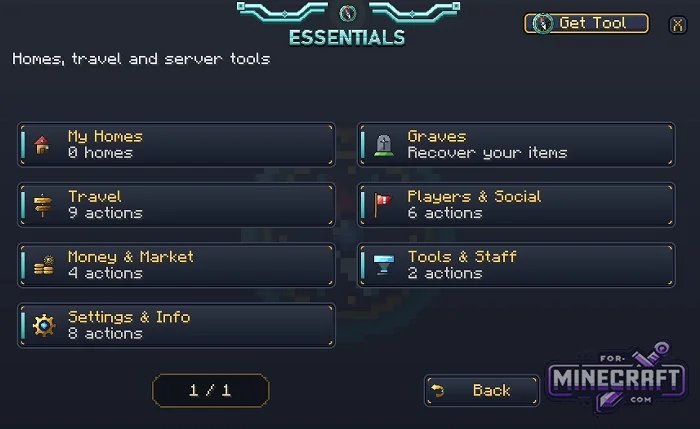
Everyone can customize the interface to their liking in Personal Settings. There, you can adjust the interface animation speed, text display, hotkeys, and other settings.
AdminCore modules:
1. Essentials
- A basic set of server functions for survival, player management, and the economy.
- Home points (/sethome, /home), teleportation (/tpa, /tpahere, respawn to death point /back), and random teleport (RTP).
- Loot protection via the graves system
- Issuing banknotes, transferring balances, creating categories, and trading via the market/auction.
- Mutes, bans, warnings, and viewing player inventories.
- Holograms and spawn points.
2. WorldEdit
- Selecting areas between two points using a wooden axe or wand (admincore_wand).
- Rotation by 90° and 180°, flipping, and generating shapes and brushes.
- Working with blueprints (saving and loading structures).
- Built-in action history with undo and redo.
3. WorldGuard
- A system for private regions and protecting territories from griefing in Bedrock 26.
- Marking private regions by corners (cuboids)
- Adding owners and members to a region.
- PvP configuration, mob spawning ban, explosion protection, interaction with chests and doors, welcome and farewell messages upon entry.
- Region priority system and overriding of existing zones.
4. CoreGuard
- An equivalent to the CoreProtect server plugin for Bedrock
- Logs the placement and destruction of blocks, explosions, falling gravel/sand, and interactions with chests and signs.
- Inspector Mode
- Point-based or mass rollback of destruction based on radius, time, or the offender's nickname.
- Rollback Preview Mode
5. Multiverse
- Management of server worlds and locations.
- Creation, generation, and deletion of additional dimensions/worlds (flat, void, skyblock, standard vanilla).
- Quick teleportation between worlds.
- Real-time online overview showing who is in which world (whos_where).
- Customization of individual world settings.
6. Anti-Cheat
- Movement checks
- Combat and action checks: KillAura, AutoClicker, Reach (extended attack range),, FastPlace (quick placement), and Nuker (mass destruction).
- Detection of invalid packets (BadPackets) and game mode changes.
- Automatic alerts to staff logging of violations for each player, kicks, bans, and an exemption list (exempt).
7. Clans
- Create clans; assign leaders, roles, and permissions within the clan.
- Clan storage and bank acount.
- Declare truces and wars (enemies); form and dissolve alliances.
- General clan chat, clan home locations and leaderboards for kills and activity.
8. Kits
- Creating, editing, and deleting kits.
- Configuring cooldowns (repeatable kits) and creating one-time kits.
- Physical safes for storing and retrieving kits (kit_vault).
- Restricting access to kits based on ranks.
9. Jobs & Quests
- A system of professions, daily tasks, and a bulletin board.
- Professions with leveling and rewards
- Bulletin board and quests
- Leaderboards for earnings and completed tasks.
10. Logs
- Administration activity log (Staff Activity) and roll call/activity tracking (Rollcall).
- Filter events by time, type, and player.
- Monitor storage and database status
- Ability to instantly clear or pause log recording.
11. RanksCore (Permissions)
- The central core for assigning server permissions and ranks.
- Create ranks and user groups.
- Assigning permissions by node (node system) down to specific menu buttons, items, or commands.
- Promoting and demoting players.
- Hiding elements restricted to certain ranks.
- Prefixes in chat and above players' heads.
12. Transfer / Cross-Server (Support Module)
- Server network and player redirection.
- Configuring a list of public, private, and staff servers.
- Moving players between servers with the click of a button.
- Centralized announcements, welcome messages, and a bulletin board.
13. Data Migration (Administrative Section)
- A tool for importing databases from third-party or legacy add-ons.
- Automatically scans the world for data from popular add-ons (AdminTools, Emerald, Spectral, WE/WG scripts) and transfers regions, balances, and permissions to Admin Core without losing progress.
14. Personal Settings
- Customize the interface for each player.
- Enable/disable item animations, choose menu themes (Kaysee, Puppet, White), and switch between hotkeys and text display modes.
- Category: Plugins for Minecraft Bedrock (PE)
Recommend:
-
 Inner Core for Minecraft PE 1.16 - 3.1.1b127-128 (ARM64 Update)
Inner Core was created on the basis of the original MCPE 1.0.3 and is a full complement for creating and playing with
Inner Core for Minecraft PE 1.16 - 3.1.1b127-128 (ARM64 Update)
Inner Core was created on the basis of the original MCPE 1.0.3 and is a full complement for creating and playing with
-
 World Conflict Addon 4.0 for Minecraft Bedrock 26.X
World Conflict has received its 4th major update bringing with it a massive list of intricately detailed vehicles,
World Conflict Addon 4.0 for Minecraft Bedrock 26.X
World Conflict has received its 4th major update bringing with it a massive list of intricately detailed vehicles,
-
 IndustrialCraft PE Mod 2.4.8 for Minecraft PE 1.16
The IndustrialCraft PE history continues and now it goes to a new level..
IndustrialCraft PE Mod 2.4.8 for Minecraft PE 1.16
The IndustrialCraft PE history continues and now it goes to a new level..
-
 IndustrialCraft PE mod v2.0 Pre-Release 7 for Minecraft PE
IndustrialCraft PE is a global mod for MCPE which is a very accurate IndustrialCraft copy for Minecraft PC. It
IndustrialCraft PE mod v2.0 Pre-Release 7 for Minecraft PE
IndustrialCraft PE is a global mod for MCPE which is a very accurate IndustrialCraft copy for Minecraft PC. It
-
 Project Silent Breakpoint - Global Conflict Addon v1.0.5 (Bedrock 26.30+)
Project Silent Breakpoint is basically a military simulator in Minecraft Bedrock 26.0. It’s a full-scale combat zone
Project Silent Breakpoint - Global Conflict Addon v1.0.5 (Bedrock 26.30+)
Project Silent Breakpoint is basically a military simulator in Minecraft Bedrock 26.0. It’s a full-scale combat zone
