-

Faithful Textures for MCPE 1.16/1.17/1.19/1.20/1.21/26.52 (32x/64x/128x) (RTX)
Now you can play with the most popular -

Minecraft PE 26.60.30 (1.21.132/26.52)
More epic battles in the new structure, wind -

Dynamic Lights PE Addon for MCPE 1.16/1.17/1.18/1.19/1.20/1.21/26.60+
Dynamic Lights has long been created for almost -

X-Ray for Minecraft Bedrock Edition 1.19/1.20/1.21.132/26.60+
X-Ray is a cult cheat in the past, available as -

TreeCapitator Addon for Minecraft PE 1.17/1.18/1.19/1.20/1.21.132 (26.60)+
No modifications, now the old TreeCapitator is -

Vein Miner & TreeCapitator Addon for Minecraft PE 1.17/1.20/1.21/26.60+
Start your first day working as a miner or -

Java Combat System Addon v8.0 for Bedrock 1.17/1.18/1.19/1.21/26.60+
Install this updated combat system in the form -

Apollon Client 6.53 for Minecraft PE 1.21.114/26.45
Apollon is a standalone client wrapped in -

Minecraft Bedrock 1.21.132/26.44/26.60.29 Patched (apk)
Do you prefer to play non render dragon shaders -

Body Actions Addon v3.4.12 for Minecraft PE 1.19/1.21.110/26.60+
Humanization of characters in Minecraft Bedrock
Inventory HUD Plus v2.2.0 Mod for Minecraft PE [IC]
- Author: Bernard
- Date:
Inventory HUD Plus displays all important information directly on the main screen so that you can see the status of items in real time. This is an InnerCore mod, so it only works on Android or PCs with an emulator. Please note that some items from the IndustrialCraft PE Mod are still not supported.
By: CuiZhenhang
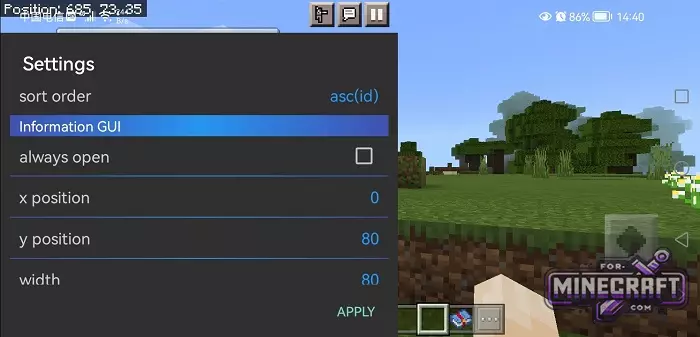
Features:
- Detailed display of armor, weapon, and shield status in the corner of the screen.
- Real-time display of ID, EMC, and block/item parameters.
- Ability to move interface elements around the screen via the settings menu.
- Visual indicator of backpack capacity without opening it.
- Separate vertical panel for quick checking of equipped items.
- Built-in ID sorting function (ascending or descending).

Updated HUD:
A block with active data will appear in the corner of the screen. Now, when you hold an item (for example, a nezirite pickaxe or bow), its ID, data value and EMC indicators are displayed next to it. This is useful if you are playing with technical mods or need to know the exact characteristics of the block directly under your crosshairs.
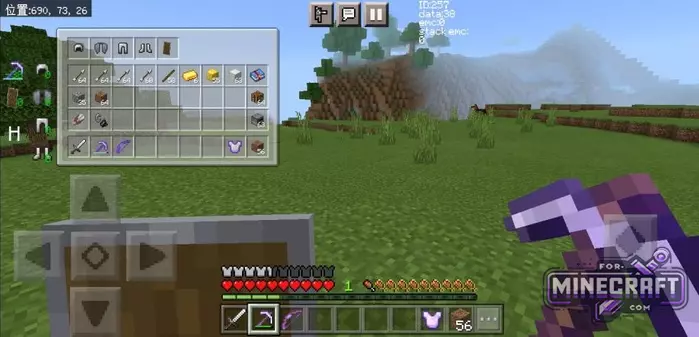
Armor and consumables:
On the left side of the screen, Inventory HUD Plus displays a mini-model of the character with all items equipped. Next to each piece of armor and shield is numbers representing their current durability. The number of free slots and items in the inventory is also displayed there.
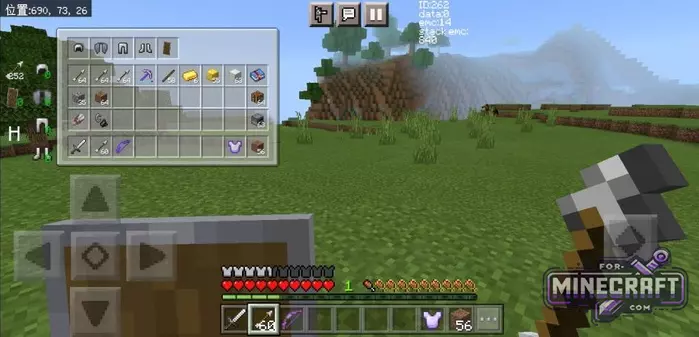
Fine tuning:
Inventory HUD Plus has a special settings menu (Information GUI) where you can customize the interface as you wish. You can change the coordinates of the info blocks on the X and Y axes, change the width of the panels and decide whether the interface should always be open or only at certain times. The ID sorting order can also be configured their.
How to install the Inventory HUD Plus Mod?
1. Install Horizon Launcher.
2. Install InnerCore Pack.
3. Download the mod in the mod manager and extract mod folder to games/Horizon/packs/Inner_Core/innercore/mods/.
- Category: Mods & Addons for Minecraft Bedrock (PE)
Recommend:
-
 IndustrialCraft PE Mod 2.4.8 for Minecraft PE 1.16
The IndustrialCraft PE history continues and now it goes to a new level..
IndustrialCraft PE Mod 2.4.8 for Minecraft PE 1.16
The IndustrialCraft PE history continues and now it goes to a new level..
-
 IndustrialCraft PE mod v2.0 Pre-Release 7 for Minecraft PE
IndustrialCraft PE is a global mod for MCPE which is a very accurate IndustrialCraft copy for Minecraft PC. It
IndustrialCraft PE mod v2.0 Pre-Release 7 for Minecraft PE
IndustrialCraft PE is a global mod for MCPE which is a very accurate IndustrialCraft copy for Minecraft PC. It
-
 Inner Core for Minecraft PE 1.16 - 3.1.1b127-128 (ARM64 Update)
Inner Core was created on the basis of the original MCPE 1.0.3 and is a full complement for creating and playing with
Inner Core for Minecraft PE 1.16 - 3.1.1b127-128 (ARM64 Update)
Inner Core was created on the basis of the original MCPE 1.0.3 and is a full complement for creating and playing with
-
 Factorization Mod 5.2 for Minecraft PE 0.11/0.12/0.13/0.14
The basis of mod make blocks-mechanisms. With these systems of the mechanisms can be automated almost any process in
Factorization Mod 5.2 for Minecraft PE 0.11/0.12/0.13/0.14
The basis of mod make blocks-mechanisms. With these systems of the mechanisms can be automated almost any process in
-
 Advanced (Super) Solar Panels Addon v2.3 for Minecraft PE
Advanced Solar Panels adds 8 cool solar panels and molecular converter! Is it impressive?
Advanced (Super) Solar Panels Addon v2.3 for Minecraft PE
Advanced Solar Panels adds 8 cool solar panels and molecular converter! Is it impressive?
