Popular
-

Faithful Textures for MCPE 1.16/1.17/1.19/1.20/1.21/26.52 (32x/64x/128x) (RTX)
Now you can play with the most popular -

Minecraft PE 26.60.30 (1.21.132/26.52)
More epic battles in the new structure, wind -

Dynamic Lights PE Addon for MCPE 1.16/1.17/1.18/1.19/1.20/1.21/26.60+
Dynamic Lights has long been created for almost -

X-Ray for Minecraft Bedrock Edition 1.19/1.20/1.21.132/26.60+
X-Ray is a cult cheat in the past, available as -

TreeCapitator Addon for Minecraft PE 1.17/1.18/1.19/1.20/1.21.132 (26.60)+
No modifications, now the old TreeCapitator is -

Vein Miner & TreeCapitator Addon for Minecraft PE 1.17/1.20/1.21/26.60+
Start your first day working as a miner or -

Java Combat System Addon v8.0 for Bedrock 1.17/1.18/1.19/1.21/26.60+
Install this updated combat system in the form -

Minecraft Bedrock 1.21.132/26.44/26.60.29 Patched (apk)
Do you prefer to play non render dragon shaders -

Body Actions Addon v3.4.12 for Minecraft PE 1.19/1.21.110/26.60+
Humanization of characters in Minecraft Bedrock -

LeviLauncher v0.3.11 (LeviLaunchroid v1.5.25) for Minecraft Bedrock 1.21.132/26.60
LeviLauncher is the tool you've been
0
Remember how spiders look at the moment and compare them with wildlife spiders. At least, developers need to reduce the spiders in MCPE ten times to create the impression of a more believable world. The Realistic Spiders addon will deal with this issue and reduce the spiders in such a way that you or any other player can hardly see the spider at night.

Usually the spider is well visible in the dark due to red eyes and a special sound. The spiders will decrease and get a size commensurable with a flower. They are still aggressive at night and do not like when they are touched. Crush the spider does not work, but you just hit it once to get rid of it.

Conversely, if you want to decrease yourself and become so small that cows are simply giants compared to players, then download the Tiny Player addon.
How to install the Realistic Spiders addon?
1. Download the file and open it using MCPE.
2. Go to the game setting and activate it.
Realistic Spiders addon (Minecraft Bedrock)
- Author: Bernard
- Date:
Remember how spiders look at the moment and compare them with wildlife spiders. At least, developers need to reduce the spiders in MCPE ten times to create the impression of a more believable world. The Realistic Spiders addon will deal with this issue and reduce the spiders in such a way that you or any other player can hardly see the spider at night.
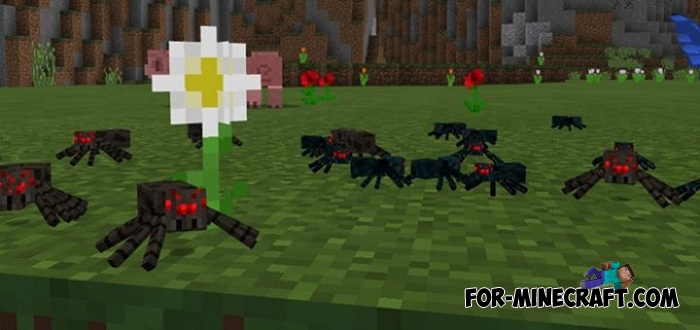
Usually the spider is well visible in the dark due to red eyes and a special sound. The spiders will decrease and get a size commensurable with a flower. They are still aggressive at night and do not like when they are touched. Crush the spider does not work, but you just hit it once to get rid of it.
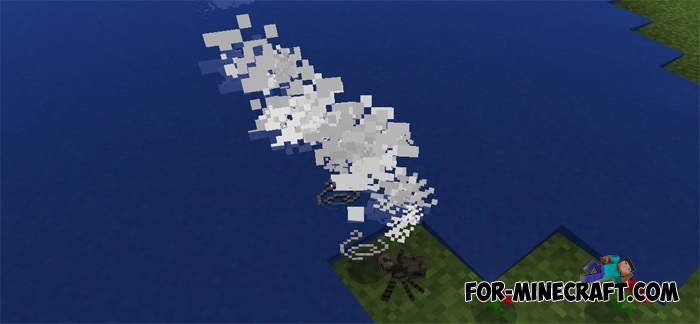
Conversely, if you want to decrease yourself and become so small that cows are simply giants compared to players, then download the Tiny Player addon.
How to install the Realistic Spiders addon?
1. Download the file and open it using MCPE.
2. Go to the game setting and activate it.
- Category: Mods & Addons for Minecraft Bedrock (PE)
Recommend:
-
 IndustrialCraft PE mod v2.0 Pre-Release 7 for Minecraft PE
IndustrialCraft PE is a global mod for MCPE which is a very accurate IndustrialCraft copy for Minecraft PC. It
IndustrialCraft PE mod v2.0 Pre-Release 7 for Minecraft PE
IndustrialCraft PE is a global mod for MCPE which is a very accurate IndustrialCraft copy for Minecraft PC. It
-
 Factorization Mod 5.2 for Minecraft PE 0.11/0.12/0.13/0.14
The basis of mod make blocks-mechanisms. With these systems of the mechanisms can be automated almost any process in
Factorization Mod 5.2 for Minecraft PE 0.11/0.12/0.13/0.14
The basis of mod make blocks-mechanisms. With these systems of the mechanisms can be automated almost any process in
-
 Avrin City for Minecraft PE Bedrock
Avrin City is a global project that pays special attention to even the smallest details..
Avrin City for Minecraft PE Bedrock
Avrin City is a global project that pays special attention to even the smallest details..
-
 Blue City Map n2.2 for Minecraft PE 1.15/1.16
Blue City is one of the oldest cities for Minecraft Pocket Edition..
Blue City Map n2.2 for Minecraft PE 1.15/1.16
Blue City is one of the oldest cities for Minecraft Pocket Edition..
-
 Factorization mod 3.3 for Minecraft PE 0.9.5
 Script adds many different variety of mechanisms that may produce,
Factorization mod 3.3 for Minecraft PE 0.9.5
Factorization mod 3.3 for Minecraft PE 0.9.5 Script adds many different variety of mechanisms that may produce,
