-

Minecraft PE 26.70.21 (1.21.132/26.52)
More epic battles in the new structure, wind -

Dynamic Lights PE Addon for MCPE 1.16/1.17/1.18/1.19/1.20/1.21/26.60+
Dynamic Lights has long been created for almost -

Vein Miner & TreeCapitator Addon for Minecraft PE 1.17/1.20/1.21/26.70+
Start your first day working as a miner or -

Apollon Client 6.70 for Minecraft PE 1.21.114/26.52
Apollon is a standalone client wrapped in -

Minecraft Bedrock 1.21.132/26.44/26.70.21 Patched (apk)
Do you prefer to play non render dragon shaders -

LeviLauncher v0.3.11 (LeviLaunchroid v1.6.0) for Minecraft Bedrock 1.21.132/26.60
LeviLauncher is the tool you've been -

Shadow Company Addon for Minecraft PE 1.21/26
A killer weapon addon for Minecraft Bedrock, -

Newb (Legacy/ Dragon/ Trailer/ Glow/ Firelight/ Gold/ Dynamite/ Memories/ Stellar/ AI/ Plus)
Uniting under a single name, all presented Newb -

Mini Structures Addon v2.0 for Minecraft PE 1.18/1.19/1.20/1.21/26.70+
There are 30 structures at the moment, and all -

Flarial Client - Release for Minecraft Bedrock 1.20/1.21/26.52
Full control over the game through ultimate
NYX Client v1.0.8 for Minecraft Bedrock 26.52+
- Author: Bernard
- Date:
NYX is a feature-rich client with a fairly standard set of features found in many other Minecraft Bedrock clients for PC. But what sets it apart is its super simple interface, minimal distractions and the most comprehensive set of cheats.
By: NYX
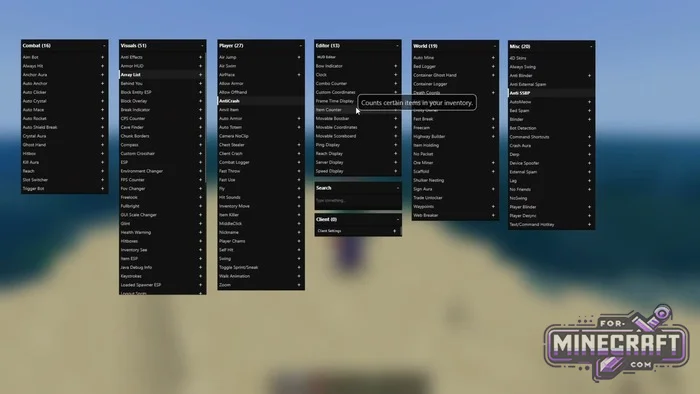
Controls and Interface Structure:
The main panel opens with the L key. The screen is divided into six basic categories: combat, visual elements, player settings, interface editor, world and other utilities. There are over a hundred function inside and a search bar at the bottom. Right-click on a module to access advanced settings hovering the cursor displays a tooltip.
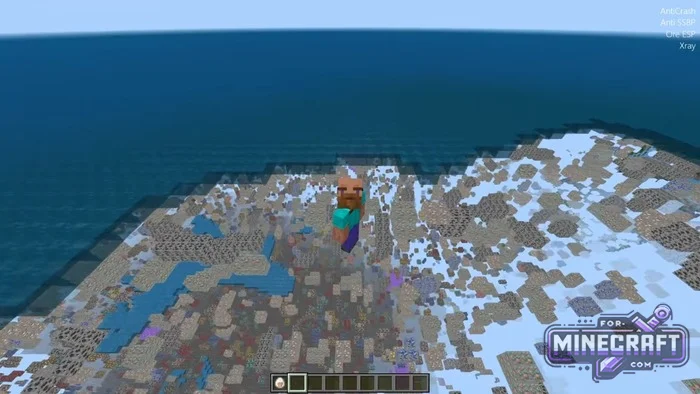
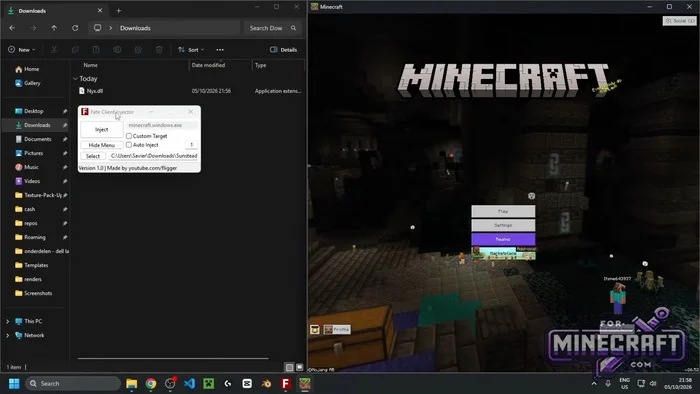
Visual Markers and Mining Assistance:
- X-ray mode hides the display of unnecessary blocks all the way down to bedrock (download Xray for Minecraft Bedrock separately as an add-on).
- Various ESP types-outline frames around ores, chests and other objects.
- A list of active modules is displayed in the corner of the screen.
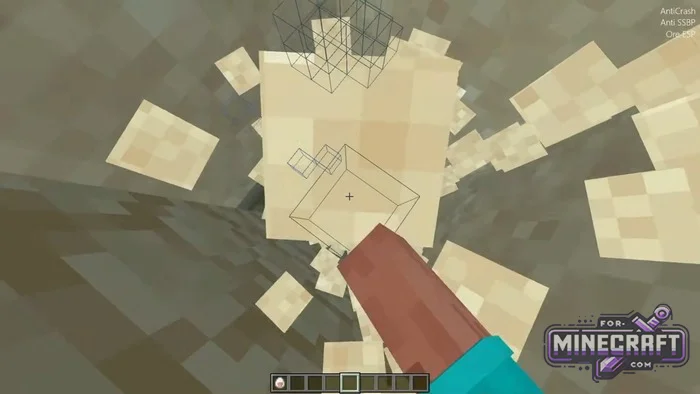
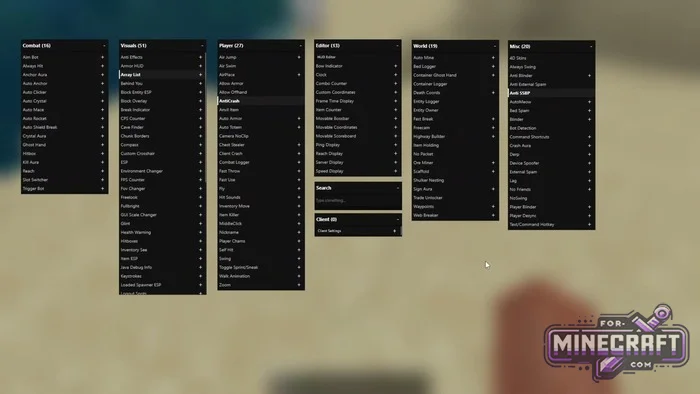
Fine-tuning and chat:
You can control the client using quick commands. They start with a period and there's also autocomplette via the Tab key with hotkeys assignable to any function, such as the CPS counter. In the system section, you can change the menu font disable vertical sync select buttons to instantly unload the mod from memory and much more. You dont have to change these settings manually.
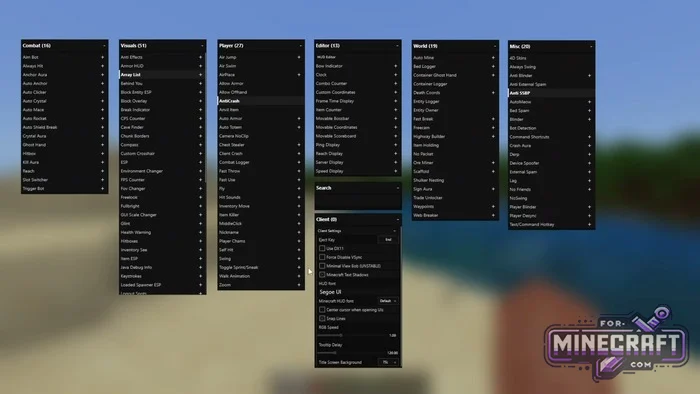
Combat:
-
Aim Bot
-
Always Hit
-
Anchor Aura
-
Auto Anchor
-
Auto Clicker
-
Auto Crystal
-
Auto Mace
-
Auto Rocket
-
Auto Shield Break
-
Crystal Aura
-
Ghost Hand
-
Hitbox
-
Kill Aura
-
Reach
-
Slot Switcher
-
Trigger Bot
Visuals:
-
Anti Effects
-
Armor HUD
-
Array List
-
Behind You
-
Block Entity ESP
-
Block Overlay
-
Break Indicator
-
CPS Counter
-
Cave Finder
-
Chunk Borders
-
Compass
-
Custom Crosshair
-
ESP
-
Environment Changer
-
FPS Counter
-
Fov Changer
-
Freelook
-
Fullbright
-
GUI Scale Changer
-
Glint
-
Health Warning
-
Hitboxes
-
Inventory See
-
Item ESP
-
Java Debug Info
-
Keystrokes
-
Loaded Spawner ESP
-
Logout Spots
Player:
-
Air Jump
-
Air Swim
-
AirPlace
-
Allow Armor
-
Allow Offhand
-
AntiCrash
-
Anvil Item
-
Auto Armor
-
Auto Totem
-
Camera NoClip
-
Chest Stealer
-
Client Crash
-
Combat Logger
-
Fast Throw
-
Fast Use
-
Fly
-
Hit Sounds
-
Inventory Move
-
Item Killer
-
MiddleClick
-
Nickname
-
Player Chams
-
Self Hit
-
Swing
-
Toggle Sprint/Sneak
-
Walk Animation
-
Zoom
Editor (HUD / Overlays):
-
HUD Editor
-
Bow Indicator
-
Clock
-
Combo Counter
-
Custom Coordinates
-
Frame Time Display
-
Item Counter
-
Movable Bossbar
-
Movable Coordinates
-
Movable Scoreboard
-
Ping Display
-
Reach Display
-
Server Display
-
Speed Display
World:
-
Auto Mine
-
Bed Logger
-
Container Ghost Hand
-
Container Logger
-
Death Coords
-
Entity Logger
-
Entity Owner
-
Fast Break
-
Freecam
-
Highway Builder
-
Item Holding
-
No Packet
-
Ore Miner
-
Scaffold
-
Shulker Nesting
-
Sign Aura
-
Trade Unlocker
-
Waypoints
-
Web Breaker
Misc:
-
4D Skins
-
Always Swing
-
Anti Blinder
-
Anti External Spam
-
Anti SSBP
-
AutoMeow
-
Bed Spam
-
Blinder
-
Bot Detection
-
Command Shortcuts
-
Crash Aura
-
Derp
-
Device Spoofer
-
External Spam
-
Lag
-
No Friends
-
NoSwing
-
Player Blinder
-
Player Desync
-
Text/Command Hotkey
Client Settings:
-
Eject Key
-
Use DX11
-
Force Disable VSync
-
Minimal View Bob (UNSTABLE)
-
Minecraft Text Shadows
-
HUD font and Minecraft HUD font
-
Center cursor when opening UIs
-
Snap Lines
-
RGB Speed
-
Tooltip Delay
-
Title Screen Background
- Category: Clients for Minecraft Bedrock
Recommend:
-
Minecraft PE 26.70.21 (1.21.132/26.52)
More epic battles in the new structure, wind shooting mob, auto crafting and more..
-
 X-Ray for Minecraft Bedrock Edition 1.19/1.20/1.21.132/26.60+
X-Ray is a cult cheat in the past, available as texture pack now. From a technical point of view..
X-Ray for Minecraft Bedrock Edition 1.19/1.20/1.21.132/26.60+
X-Ray is a cult cheat in the past, available as texture pack now. From a technical point of view..
-
 IndustrialCraft PE Mod 2.4.8 for Minecraft PE 1.16
The IndustrialCraft PE history continues and now it goes to a new level..
IndustrialCraft PE Mod 2.4.8 for Minecraft PE 1.16
The IndustrialCraft PE history continues and now it goes to a new level..
-
 Inner Core for Minecraft PE 1.16 - 3.1.1b127-128 (ARM64 Update)
Inner Core was created on the basis of the original MCPE 1.0.3 and is a full complement for creating and playing with
Inner Core for Minecraft PE 1.16 - 3.1.1b127-128 (ARM64 Update)
Inner Core was created on the basis of the original MCPE 1.0.3 and is a full complement for creating and playing with
-
 IndustrialCraft PE mod v2.0 Pre-Release 7 for Minecraft PE
IndustrialCraft PE is a global mod for MCPE which is a very accurate IndustrialCraft copy for Minecraft PC. It
IndustrialCraft PE mod v2.0 Pre-Release 7 for Minecraft PE
IndustrialCraft PE is a global mod for MCPE which is a very accurate IndustrialCraft copy for Minecraft PC. It
