-

Faithful Textures for MCPE 1.16/1.17/1.19/1.20/1.21/26.52 (32x/64x/128x) (RTX)
Now you can play with the most popular -

Minecraft PE 26.60.30 (1.21.132/26.52)
More epic battles in the new structure, wind -

Dynamic Lights PE Addon for MCPE 1.16/1.17/1.18/1.19/1.20/1.21/26.60+
Dynamic Lights has long been created for almost -

X-Ray for Minecraft Bedrock Edition 1.19/1.20/1.21.132/26.60+
X-Ray is a cult cheat in the past, available as -

TreeCapitator Addon for Minecraft PE 1.17/1.18/1.19/1.20/1.21.132 (26.60)+
No modifications, now the old TreeCapitator is -

Vein Miner & TreeCapitator Addon for Minecraft PE 1.17/1.20/1.21/26.60+
Start your first day working as a miner or -

Java Combat System Addon v8.0 for Bedrock 1.17/1.18/1.19/1.21/26.60+
Install this updated combat system in the form -

Apollon Client 6.53 for Minecraft PE 1.21.114/26.45
Apollon is a standalone client wrapped in -

Minecraft Bedrock 1.21.132/26.44/26.60.29 Patched (apk)
Do you prefer to play non render dragon shaders -

Body Actions Addon v3.4.12 for Minecraft PE 1.19/1.21.110/26.60+
Humanization of characters in Minecraft Bedrock
Report UI Plugin for Minecraft Bedrock 1.21/26.10+
- Author: Bernard
- Date:
No need to search for text commands or a server group/channel to report a violator. The Report UI Plugin lets you send complaints directly from the server through a convenient menu. It also has a control panel where administrators can review complaints and make decisions. It is essentailly a full-fledged server plugin that also supports Bedrock Realms.
By: GMD12342953 / Huyfast
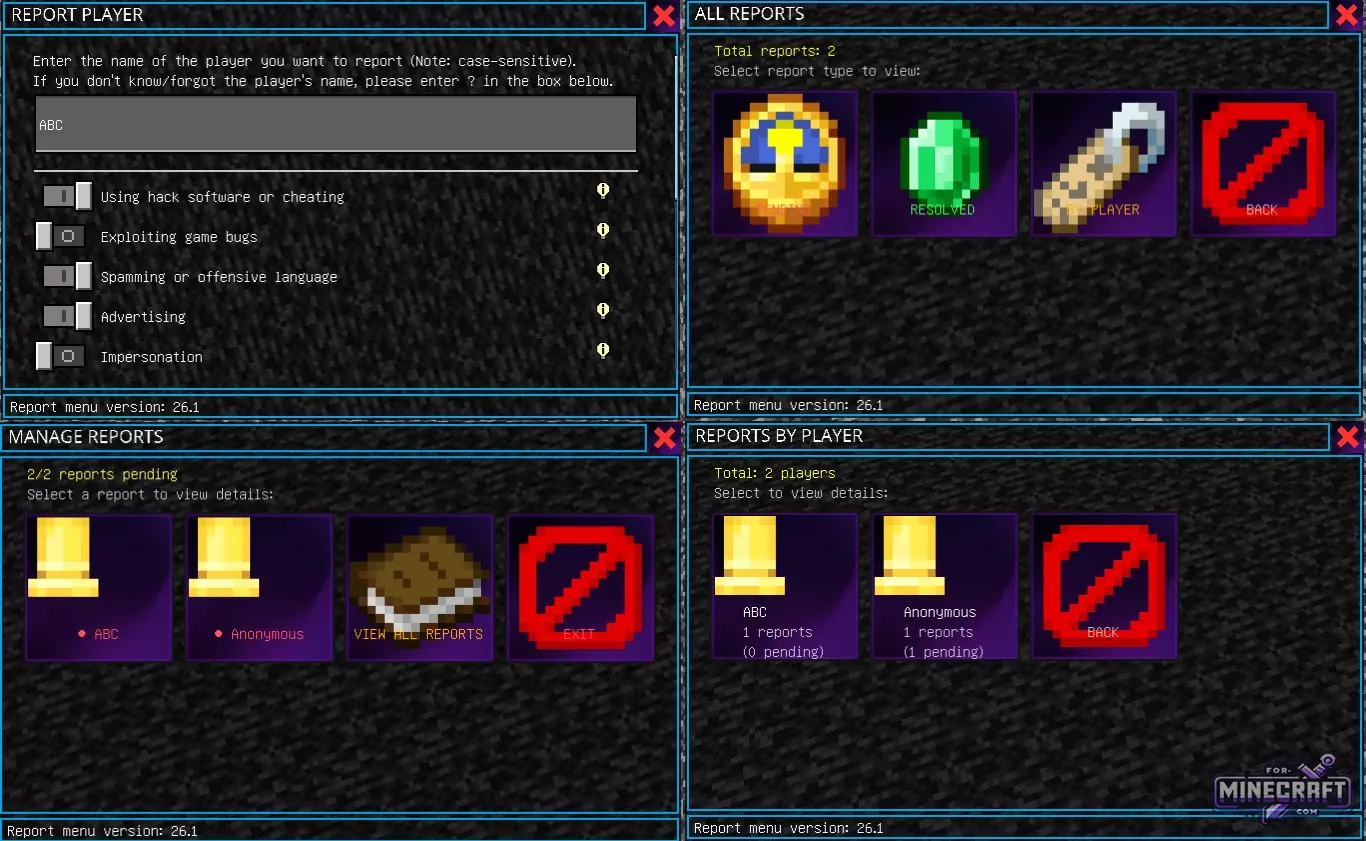
Features:
- Works with convenient buttons and sliders instead of text.
- Ability to report a player by specifying details about their appearance and location.
- The admin sees reports on specific players, including there history of violations.
- Support for complaints about anonymous players if the players name is hidden or unknown.
- The /report_reset command allows you to instantly reset the entire complaints database.
- The Severity scale helps administrators prioritize the most serious violations.
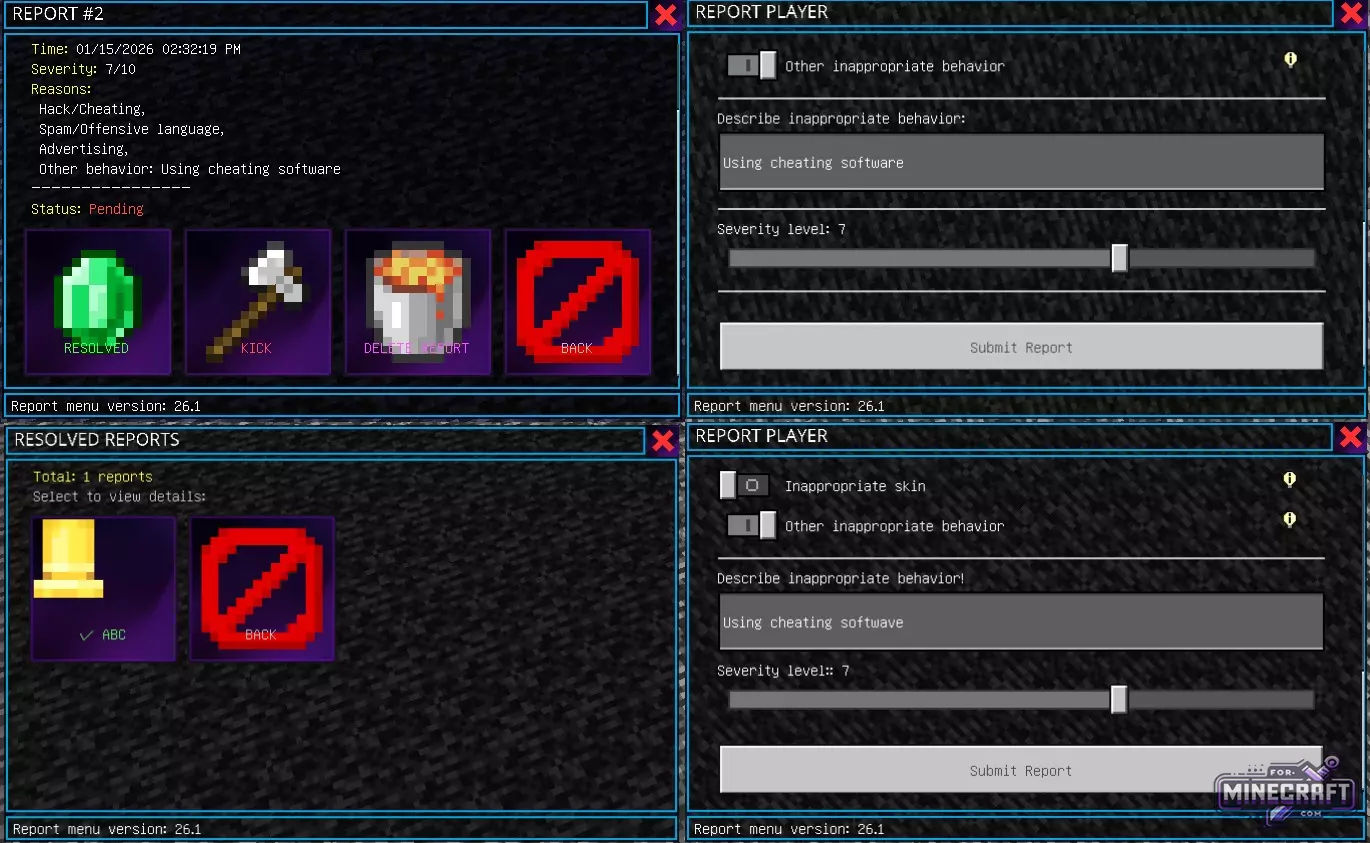
How to report a player?
If you notice a cheater or spammer just type /report. A window will open where you need to enter the players nickname. After entering the name, simply check the appropriate boxes, from using hacks and bugs, to advertising or insults. For a more accurate assesment of the situation, there is a severity slider from 0 to 10.
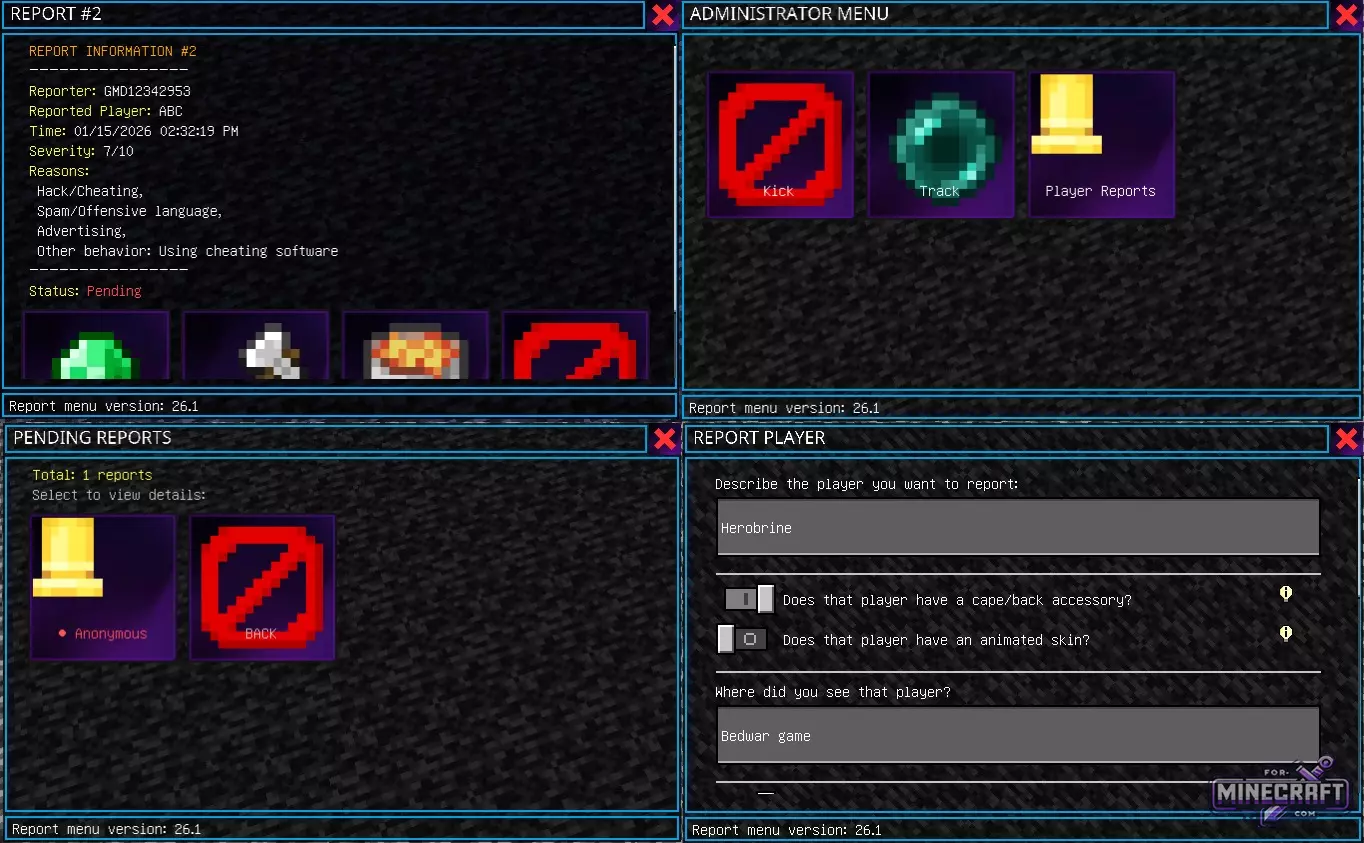
What if I forgot the nickname?
Instead of the name, enter a question mark "?" and the menu will switch to description mode. Here you can specify external features (for example, the presence of a cloak or skin animation), the main color of the character or the meeting place, for example, a Bedwar game. This greatly simplifies the life of moderators when searching for violators in the logs.
Admin workspace:
To manage complaints you need to have the admin tag and use the /admin command. The admin sees the total number of active complaints, and can filter them by status; "Pending" or "Resolved." Admins can also click the 'Kick' button to exclude a player, or "Resolved" to close a ticket.
- Category: Plugins for Minecraft PE
Recommend:
-
Minecraft PE 26.60.30 (1.21.132/26.52)
More epic battles in the new structure, wind shooting mob, auto crafting and more..
-
 IndustrialCraft PE mod v2.0 Pre-Release 7 for Minecraft PE
IndustrialCraft PE is a global mod for MCPE which is a very accurate IndustrialCraft copy for Minecraft PC. It
IndustrialCraft PE mod v2.0 Pre-Release 7 for Minecraft PE
IndustrialCraft PE is a global mod for MCPE which is a very accurate IndustrialCraft copy for Minecraft PC. It
-
 Download Minecraft PE 1.16.230.56 (1.16.221) - Nether Update
The most massive Nether update with new mobs, plants and biomes!
Download Minecraft PE 1.16.230.56 (1.16.221) - Nether Update
The most massive Nether update with new mobs, plants and biomes!
-
 Inner Core for Minecraft PE 1.16 - 3.1.1b127-128 (ARM64 Update)
Inner Core was created on the basis of the original MCPE 1.0.3 and is a full complement for creating and playing with
Inner Core for Minecraft PE 1.16 - 3.1.1b127-128 (ARM64 Update)
Inner Core was created on the basis of the original MCPE 1.0.3 and is a full complement for creating and playing with
-
 Minecraft PE 1.19.80.24 Beta (1.19.81 Release)
Meet the officially announced Minecraft PE 1.19 update with frogs, warden, fireflies and swamps!
Minecraft PE 1.19.80.24 Beta (1.19.81 Release)
Meet the officially announced Minecraft PE 1.19 update with frogs, warden, fireflies and swamps!
