-

Faithful Textures for MCPE 1.16/1.17/1.19/1.20/1.21/26.52 (32x/64x/128x) (RTX)
Now you can play with the most popular -

Minecraft PE 26.60.30 (1.21.132/26.52)
More epic battles in the new structure, wind -

Dynamic Lights PE Addon for MCPE 1.16/1.17/1.18/1.19/1.20/1.21/26.60+
Dynamic Lights has long been created for almost -

X-Ray for Minecraft Bedrock Edition 1.19/1.20/1.21.132/26.60+
X-Ray is a cult cheat in the past, available as -

TreeCapitator Addon for Minecraft PE 1.17/1.18/1.19/1.20/1.21.132 (26.60)+
No modifications, now the old TreeCapitator is -

Vein Miner & TreeCapitator Addon for Minecraft PE 1.17/1.20/1.21/26.60+
Start your first day working as a miner or -

Java Combat System Addon v8.0 for Bedrock 1.17/1.18/1.19/1.21/26.60+
Install this updated combat system in the form -

Apollon Client 6.53 for Minecraft PE 1.21.114/26.45
Apollon is a standalone client wrapped in -

Minecraft Bedrock 1.21.132/26.44/26.60.29 Patched (apk)
Do you prefer to play non render dragon shaders -

Body Actions Addon v3.4.12 for Minecraft PE 1.19/1.21.110/26.60+
Humanization of characters in Minecraft Bedrock
Custom Slot Buttons v1.2.0 for Minecraft Bedrock 26.20 (1.21+)
- Author: Bernard
- Date:
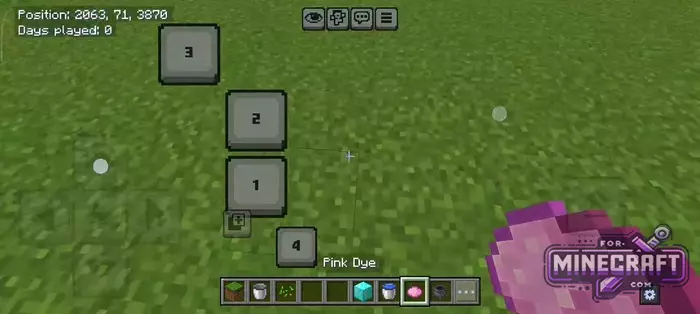
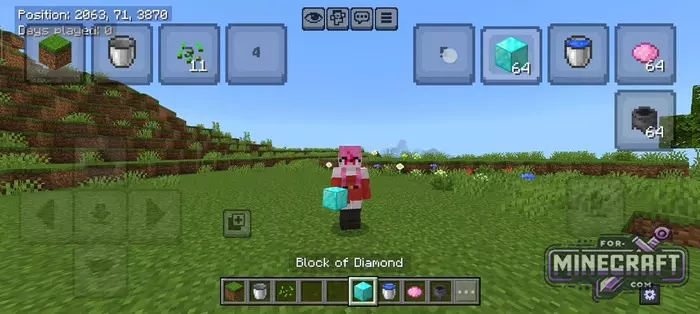
If you play Minecraft Bedrock on a touchscreen, you know how difficult it is to quickly switch to the correct slot during combat or building, so just forget about the standard item bar. Slot Hotbar Button or Custom Slot Buttons lets you move inventory control to any point on the display thanks to flexible settings and a handy menu.
By: Itzriyo157
Changelog:
v1.2.0:
- Improvements to element layout
- MCPE 26.20.27 support
Features:
- Support for simultaneous presses for smooth, uninterrupted gameplay.
- The "Show Button Items" option lets you see the contents of the slot (e.g. a stack of diamonds or a bucket of water) right on the button.
- Each of the 9 slots can be moved independently from the others.
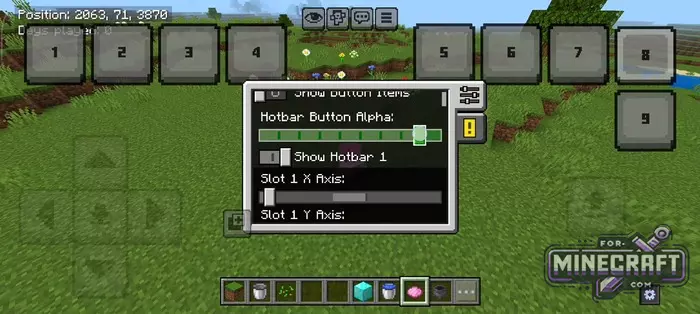
- The transparency slider helps you adapt the buttons to any lighting in the enviroment.
- Resize elements for different screen diagonals.
- Save via JSON config (if you want to recieve your settings).
Hotbar movement freedom:
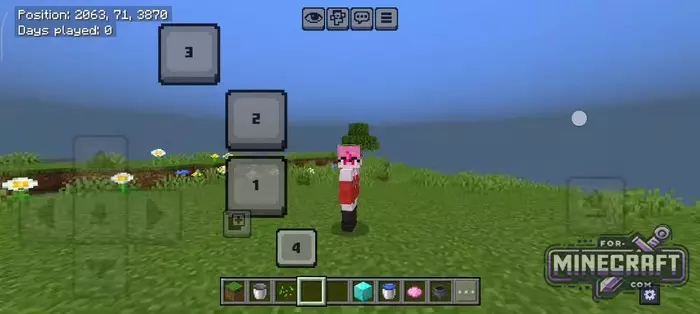
Independent on-screen buttons that mirror your hotbar slots are a new way to control items in Bedrock 26.0. You can arrange them in a "ladder" or in a circle, opening the possibility of playing with multiple fingers. While one hand is responsible for movement the other can instantly switch from a pickaxe to a shovel or place a block without interrupting the main action.
Fine-tuning for your fingers:
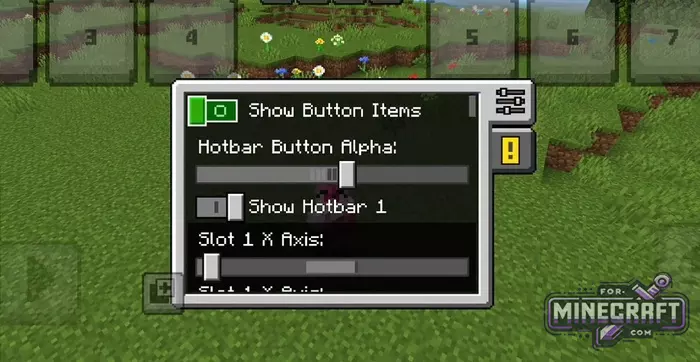
Instead of fixed interfaces there's a flexible editor.
- Transparency (Alpha)
- Display of items
- X and Y coordinates
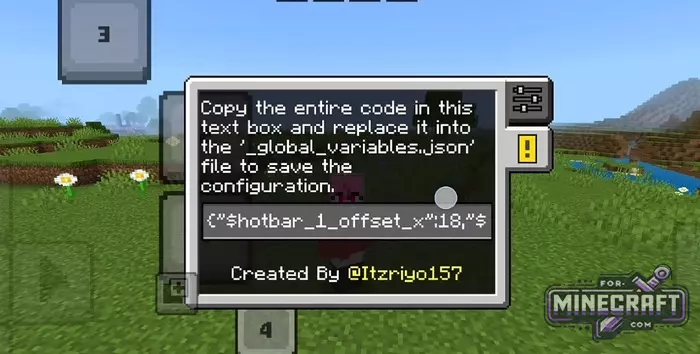
It's worth considering the technical point that the Bedrock engine cant save the position of custom UI elements permanently; To prevent your settings from being reset after re-entering, you need to copy the generated code from the text field in the game and paste it into the _global_variables.json file.
Reason: Added 1.2.0 update
- Category: Texture Packs for Minecraft Bedrock
Recommend:
-
Minecraft PE 26.60.30 (1.21.132/26.52)
More epic battles in the new structure, wind shooting mob, auto crafting and more..
-
 IndustrialCraft PE mod v2.0 Pre-Release 7 for Minecraft PE
IndustrialCraft PE is a global mod for MCPE which is a very accurate IndustrialCraft copy for Minecraft PC. It
IndustrialCraft PE mod v2.0 Pre-Release 7 for Minecraft PE
IndustrialCraft PE is a global mod for MCPE which is a very accurate IndustrialCraft copy for Minecraft PC. It
-
 Minecraft PE 1.19.80.24 Beta (1.19.81 Release)
Meet the officially announced Minecraft PE 1.19 update with frogs, warden, fireflies and swamps!
Minecraft PE 1.19.80.24 Beta (1.19.81 Release)
Meet the officially announced Minecraft PE 1.19 update with frogs, warden, fireflies and swamps!
-
 Download Minecraft PE 1.16.230.56 (1.16.221) - Nether Update
The most massive Nether update with new mobs, plants and biomes!
Download Minecraft PE 1.16.230.56 (1.16.221) - Nether Update
The most massive Nether update with new mobs, plants and biomes!
-
 Factorization Mod 5.2 for Minecraft PE 0.11/0.12/0.13/0.14
The basis of mod make blocks-mechanisms. With these systems of the mechanisms can be automated almost any process in
Factorization Mod 5.2 for Minecraft PE 0.11/0.12/0.13/0.14
The basis of mod make blocks-mechanisms. With these systems of the mechanisms can be automated almost any process in
