Popular
-

Faithful Textures for MCPE 1.16/1.17/1.19/1.20/1.21/26.52 (32x/64x/128x) (RTX)
Now you can play with the most popular -

Minecraft PE 26.60.30 (1.21.132/26.52)
More epic battles in the new structure, wind -

Dynamic Lights PE Addon for MCPE 1.16/1.17/1.18/1.19/1.20/1.21/26.60+
Dynamic Lights has long been created for almost -

X-Ray for Minecraft Bedrock Edition 1.19/1.20/1.21.132/26.60+
X-Ray is a cult cheat in the past, available as -

TreeCapitator Addon for Minecraft PE 1.17/1.18/1.19/1.20/1.21.132 (26.60)+
No modifications, now the old TreeCapitator is -

Vein Miner & TreeCapitator Addon for Minecraft PE 1.17/1.20/1.21/26.60+
Start your first day working as a miner or -

Java Combat System Addon v8.0 for Bedrock 1.17/1.18/1.19/1.21/26.60+
Install this updated combat system in the form -

Apollon Client 6.53 for Minecraft PE 1.21.114/26.45
Apollon is a standalone client wrapped in -

Minecraft Bedrock 1.21.132/26.44/26.60.29 Patched (apk)
Do you prefer to play non render dragon shaders -

Body Actions Addon v3.4.12 for Minecraft PE 1.19/1.21.110/26.60+
Humanization of characters in Minecraft Bedrock
0
Instead of typing long commands, just install Utility Menu and control the game through a simple and intuitive interface. No more commands are required (at least for the main game features) - everything is now accessible through a convenient menu for both you and players with admin rights.
By: menezesss0
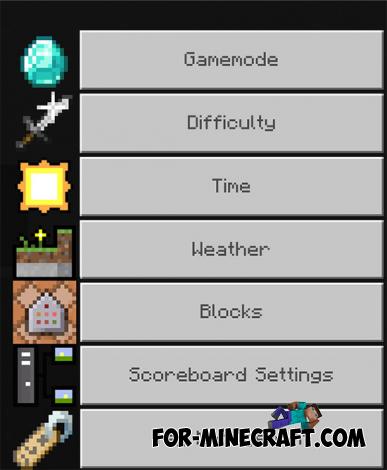
But if you're looking for full control over everything that can be adjusted or modified in the game, then consider using a suitable client for Minecraft PE 1.21 - one that includes both standard options and built-in cheats directly in the menu.
1. Open the file (.mcaddon) using Minecraft PE
2. Enable the plugin in the game settings
Utility Menu Plugin v3.2 for Minecraft PE 1.21
- Author: Bernard
- Date:
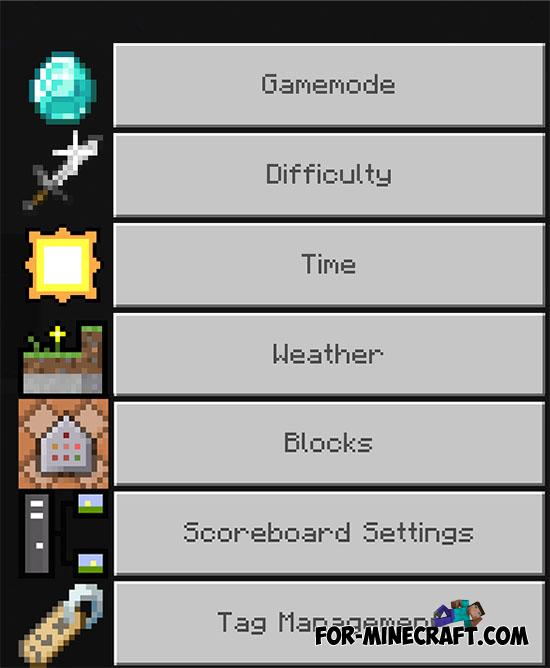
Instead of typing long commands, just install Utility Menu and control the game through a simple and intuitive interface. No more commands are required (at least for the main game features) - everything is now accessible through a convenient menu for both you and players with admin rights.
By: menezesss0
What is the Utility Menu or Mod Menu?
In Minecraft Bedrock, it's a regular menu that includes all the main game control toggles available for adjustment. It doesn't include advanced technical settings or configuration files.Here's an example of the menu:
Total Game Control:
But if you're looking for full control over everything that can be adjusted or modified in the game, then consider using a suitable client for Minecraft PE 1.21 - one that includes both standard options and built-in cheats directly in the menu.
How to install the Utility Menu Plugin?
1. Open the file (.mcaddon) using Minecraft PE
2. Enable the plugin in the game settings
- Category: Plugins for Minecraft PE
Recommend:
-
Minecraft PE 26.60.30 (1.21.132/26.52)
More epic battles in the new structure, wind shooting mob, auto crafting and more..
-
 Minecraft PE 1.19.80.24 Beta (1.19.81 Release)
Meet the officially announced Minecraft PE 1.19 update with frogs, warden, fireflies and swamps!
Minecraft PE 1.19.80.24 Beta (1.19.81 Release)
Meet the officially announced Minecraft PE 1.19 update with frogs, warden, fireflies and swamps!
-
 Download Minecraft PE 1.16.230.56 (1.16.221) - Nether Update
The most massive Nether update with new mobs, plants and biomes!
Download Minecraft PE 1.16.230.56 (1.16.221) - Nether Update
The most massive Nether update with new mobs, plants and biomes!
-
 Minecraft PE 1.20.80.24 (1.20.80 Release)
Camels, hanging signs, sniffers and rafts and much more..
Minecraft PE 1.20.80.24 (1.20.80 Release)
Camels, hanging signs, sniffers and rafts and much more..
-
 Factorization Mod 5.2 for Minecraft PE 0.11/0.12/0.13/0.14
The basis of mod make blocks-mechanisms. With these systems of the mechanisms can be automated almost any process in
Factorization Mod 5.2 for Minecraft PE 0.11/0.12/0.13/0.14
The basis of mod make blocks-mechanisms. With these systems of the mechanisms can be automated almost any process in
