Popular
-

Faithful Textures for MCPE 1.16/1.17/1.19/1.20/1.21/26.52 (32x/64x/128x) (RTX)
Now you can play with the most popular -

Minecraft PE 26.60.30 (1.21.132/26.52)
More epic battles in the new structure, wind -

Dynamic Lights PE Addon for MCPE 1.16/1.17/1.18/1.19/1.20/1.21/26.60+
Dynamic Lights has long been created for almost -

X-Ray for Minecraft Bedrock Edition 1.19/1.20/1.21.132/26.60+
X-Ray is a cult cheat in the past, available as -

TreeCapitator Addon for Minecraft PE 1.17/1.18/1.19/1.20/1.21.132 (26.60)+
No modifications, now the old TreeCapitator is -

Vein Miner & TreeCapitator Addon for Minecraft PE 1.17/1.20/1.21/26.60+
Start your first day working as a miner or -

Java Combat System Addon v8.0 for Bedrock 1.17/1.18/1.19/1.21/26.60+
Install this updated combat system in the form -

Minecraft Bedrock 1.21.132/26.44/26.60.29 Patched (apk)
Do you prefer to play non render dragon shaders -

Body Actions Addon v3.4.12 for Minecraft PE 1.19/1.21.110/26.60+
Humanization of characters in Minecraft Bedrock -

LeviLauncher v0.3.11 (LeviLaunchroid v1.5.25) for Minecraft Bedrock 1.21.132/26.60
LeviLauncher is the tool you've been
15
This addon for Minecraft Pocket Edition 0.14.0/0.15.6 will change the game interface and makes it look like on a Windows 10 Edition. Thus you can play with an interface that is more like the PC version of Minecraft.
Installation:
Download the archive
Unpack the archive using the File Manager
Open BlockLauncher (download v0.14.0/0.15.0) and go to the settings
Find the "PTPatch" and click on "Add". Find an unpacked patch "Win10UI.mod" and click on it to add
Enable Patch
The patch is installed!
Win 10 UI addon for Minecraft PE 0.14/0.15.6
- Author: Bernard
- Date:
This addon for Minecraft Pocket Edition 0.14.0/0.15.6 will change the game interface and makes it look like on a Windows 10 Edition. Thus you can play with an interface that is more like the PC version of Minecraft.
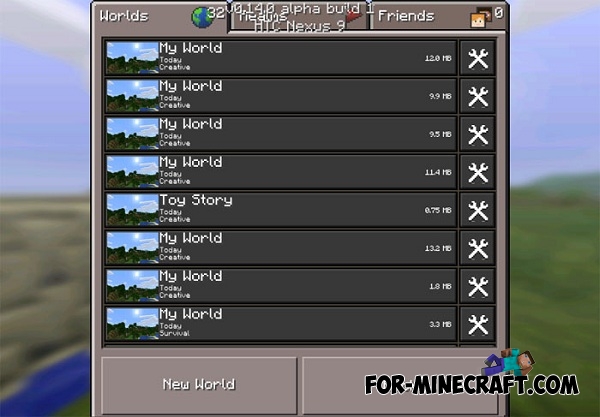
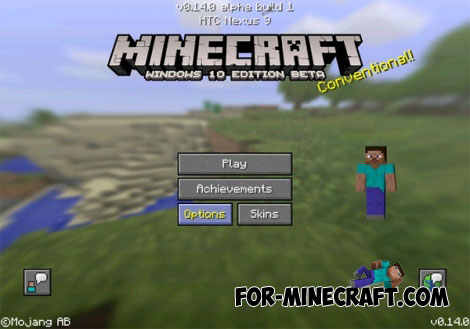
You just need to click on the icon to move things in the inventory.
Changes v6 (0.15.0):
Support for Minecraft PE 0.15.0 Build 1/2;
Changes v5:
Support for Minecraft PE Build 5;
Changes v4:
Support for Minecraft PE Build 4;
Installation:
Download the archive
Unpack the archive using the File Manager
Open BlockLauncher (download v0.14.0/0.15.0) and go to the settings
Find the "PTPatch" and click on "Add". Find an unpacked patch "Win10UI.mod" and click on it to add
Enable Patch
The patch is installed!
- Category: Mods & Addons for Minecraft Bedrock (PE)
Recommend:
-
 Pumpkin Patch Resource Pack for Minecraft 1.8.2
 With this resolution is very difficult and almost impossible to reveal
Pumpkin Patch Resource Pack for Minecraft 1.8.2
Pumpkin Patch Resource Pack for Minecraft 1.8.2 With this resolution is very difficult and almost impossible to reveal
-
 Factorization Mod 5.2 for Minecraft PE 0.11/0.12/0.13/0.14
The basis of mod make blocks-mechanisms. With these systems of the mechanisms can be automated almost any process in
Factorization Mod 5.2 for Minecraft PE 0.11/0.12/0.13/0.14
The basis of mod make blocks-mechanisms. With these systems of the mechanisms can be automated almost any process in
-
 Cars and Drives Mod for Minecraft 1.7.10 / 1.7.2
Cars and Drives Mod makes it possible to make real machine in minecraft. Most importantly, you can to drive a car! In
Cars and Drives Mod for Minecraft 1.7.10 / 1.7.2
Cars and Drives Mod makes it possible to make real machine in minecraft. Most importantly, you can to drive a car! In
-
 Minecraft: Windows 10 Edition announcement
Mojang and Microsoft announced a new version of the game, which will be released specifically for Windows 10.
Minecraft: Windows 10 Edition announcement
Mojang and Microsoft announced a new version of the game, which will be released specifically for Windows 10.
-
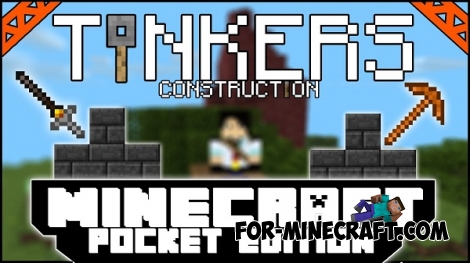 Tinker’s Construct Mod for Minecraft PE 0.13.0/0.13.1
This addon will add to your world a lot of different tools and alloys! All tools can be broken, but then you can
Tinker’s Construct Mod for Minecraft PE 0.13.0/0.13.1
This addon will add to your world a lot of different tools and alloys! All tools can be broken, but then you can
